Donation Receipts
Open the Donations Module and click the Donation Statements (or go to Reports / Export in the Button Bar at the top of the screen, then click Donations Statement). Then click the Donation Receipt button (will appear for Canada users only):
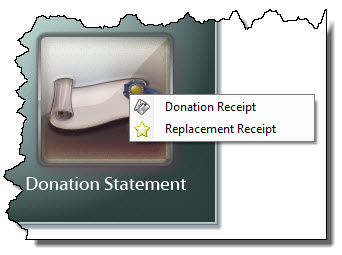
The Step 1 — Select who should appear on the report window will appear:
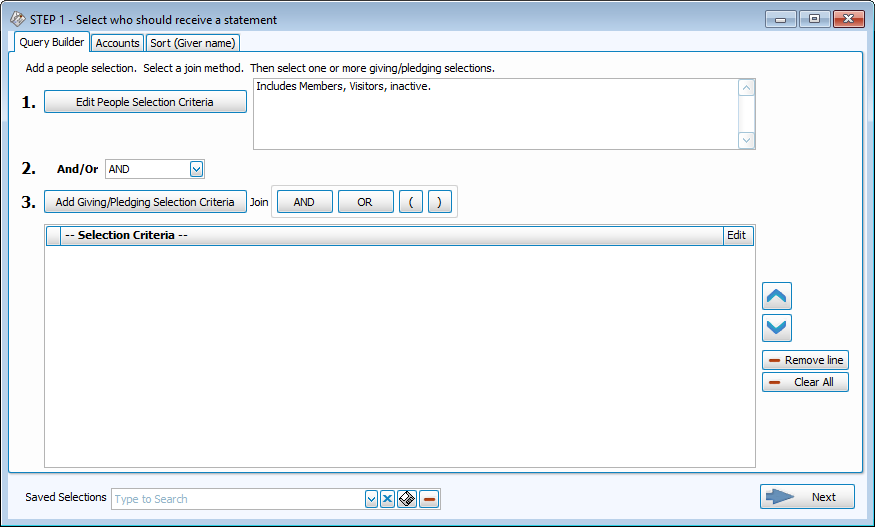
- Enter the applicable selections and Date Range on the Giving / Pledging Tab.
- Select the Giver using the features on theGivers / People Tab of the screen. Continue to use the other features and tabs you need for the receipts you want to print. See Donation Statements for further information.
- When you're finished, click the → Next button.
- The Step 2 — Select the report layout/format window will appear.
- Before printing, click the Donations Receipt Info tab:
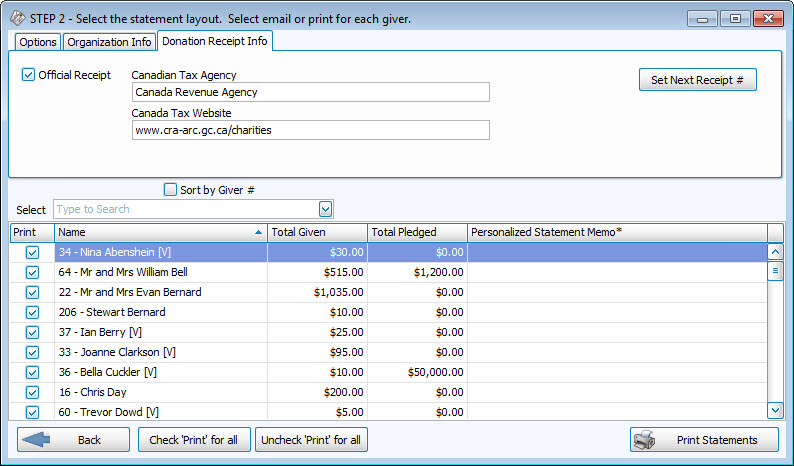
- Click the Set Next Receipt # button. The number that appears there will be the next receipt number and will print on the first donation receipt in the next series of receipts that you print. This number can only be set once, and may NOT be edited without the help of a Church Windows Support Technician.
- Place a
 checkmark in the Official Receipt box only when you are ready to print the official donation receipts. When you click the Print Statements button, and print the receipts on paper, the number in the Set Next Receipt # option will then increase. If you need to print the receipts for informational purposes only, do not place a check in the Official Receipt box. This will let you also make full use of the other functions of the Print Preview screen.
 - When you print your receipts and close the Print Preview screen, a message will tell you the numbers of the Donation Receipts that printed. If there are any issues with printing the donation receipts, close the Donation Receipt screen and choose the Replacement Donation Receipts menu option under the Donation Statements button.
If the ending receipt number does not match the number on the on-screen message, please contact our Technical Support staff at 800.533.5227 or support@churchwindows.com (be sure to add this address to your email contacts list to ensure delivery) or visit the Support Center on our website for additional training materials. for help in re-setting your receipt numbers.
